
MusicLab:AI Song & Music Video
AI Song & Music Maker & AI Video & AI PhotoMusic & Audio
4.5401.00 Reviews
- Version
- 1.4.6
- Installs
- 1.00M
- Age Rating
- Teen
Screenshots
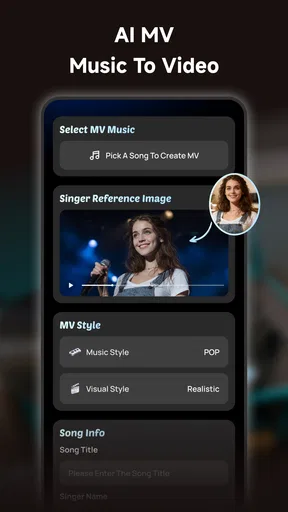
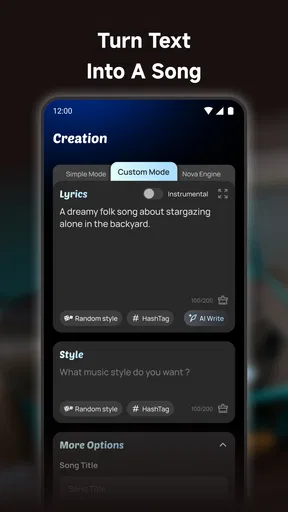
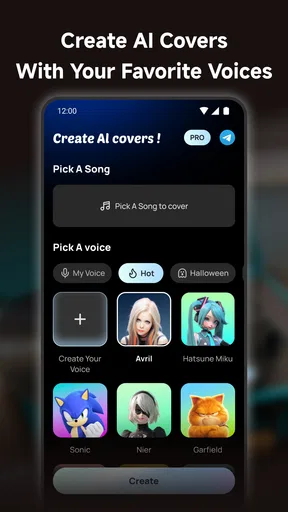
Our Review of MusicLab:AI Song & Music Video
 Analysis by Appyee
I’d approach MusicLab: AI Song & Music Video as a quick creative workshop, not as a replacement for a recording studio or a full video editor. That distinction matters: an AI music app can help turn a rough idea into something shareable, but it won’t automatically give you the fine control or predictable results of a carefully built project. If you want to experiment with songs and visuals on your phone, the idea is appealing; if you need exact production control, it is worth comparing it with more specialised tools first.
What I would decide before opening it
My first question would be what I want to finish. A playful track for a group chat, a mood-setting clip for a personal post, and a polished song for a serious release are very different jobs. MusicLab sounds most relevant when the goal is to explore an idea and make a compact audiovisual piece without first learning a complex production workflow. I would not choose it as my only tool for a project that depends on precise mixing, detailed arrangement, or a particular visual edit.
The app is in the music and audio category, and its developer is AI Song & Music Maker & AI Video & AI Photo. It is free to install, rated for Everyone, and has optional in-app purchases ranging from $0.99 to $199.99 per item. I’d treat “free” as a low-friction way to try the creative process, not as a promise that every tool or continued use will be free. Before building a project around a paid option, I’d check what the app presents at the point of use and decide whether that specific result is worth paying for.
Where its all-in-one idea helps
The useful part of combining music creation and video-making is the shorter path between imagining a sound and seeing it paired with visuals. Instead of moving immediately between a music tool and a separate editor, I can start with a musical direction, then shape a video around the result. That makes the app especially approachable for someone who has an idea but not a production routine yet. The store summary points to styles such as rap and rock, so those are natural starting directions to test rather than assuming the same approach will suit every genre.
For a practical experiment, I’d make one short concept at a time: pick a clear mood, keep the wording or musical prompt focused, and judge the output against that intention. If I ask for too many contrasting things at once—say, an upbeat feel with a gloomy atmosphere and several unrelated genre cues—it becomes harder to tell whether the result missed the mark or the idea itself was muddled. A simple first pass gives me something to react to; a second, narrower pass can test whether changing one creative choice makes the piece feel closer.
That one-variable approach is a small but useful habit. Save or note what you were trying to achieve before changing direction, then compare versions by asking a specific question: does this one feel more energetic, more intimate, or more suited to the clip? It turns AI generation from blind button-pressing into a lightweight creative process. I would also keep a copy of any finished work somewhere outside the app if I care about holding onto it; that is sensible housekeeping for any mobile creative project, not a claim about how MusicLab stores files.
Who is likely to enjoy it—and who may not
I can see MusicLab working well for curious beginners, casual creators, and people who want a quick starting point for a song-and-video idea. It may also suit someone who enjoys trying several musical directions without investing in a desktop setup first. A realistic use would be making a fun birthday clip on the bus ride home: start with a personal theme, try a light musical direction, choose visuals that match the recipient, and review the result before sharing it. The point is the creative gesture, not pretending a phone-made draft is a finished commercial production.
On the other hand, I’d steer a musician who already knows exactly how they want to edit toward a dedicated digital audio workstation or a conventional editor. Those tools are generally a better fit when you need deliberate control over individual tracks, detailed timing, nuanced sound shaping, or a carefully cut sequence. That comparison is about the different kinds of workflows these categories offer, not a claim that every alternative has the same features. MusicLab’s appeal is the approachable combination; the trade-off is that an all-in-one creative flow may not satisfy someone who wants each production decision exposed and adjustable.
How I’d test it without wasting time
I’d begin with a small, low-stakes project rather than trying to create a complete release on the first session. Choose one purpose and one mood, generate or provide the musical starting point that suits your plan, then see how the visual choices support it. If the app offers styles, templates, or effects during your workflow, I’d change one at a time. That makes it easier to understand what each choice contributes and avoids spending a long session polishing a direction you do not actually like.
I’d also listen and watch the result in the setting where I expect to use it. A clip that feels lively through headphones might come across differently on a phone speaker, while a visual effect that looks striking in the editor could compete with the music on a small screen. This is not a special MusicLab setting; it is a practical check for any song-and-video creation app. A final review before sharing can catch mismatched mood, an abrupt ending, or visuals that distract from the sound.
For a first-time user, the sensible question is not “Can it make a perfect song?” but “Can it help me get from an idea to a result I enjoy?” If the first output is not right, I would revise the concept instead of making several unrelated changes at once. If I still cannot guide the result toward what I want, that is a useful sign that a more hands-on music or video tool may suit the project better. The app’s value is clearest when experimentation itself is part of the fun.
What to expect from the app’s place in the market
MusicLab has an average rating of 4.5 from around 34,000 ratings, and it has passed one million installs. Those figures suggest that many people have tried it, but they do not tell me whether its creative approach will match my taste. I’d use them as context, then make my own call based on a small test project. It was released on June 8, 2024, and version 1.2.7 is the current version. It supports Android 7.0 and later, which makes it an option for a broad range of Android devices, though I would still expect the feel of creative work to vary with a phone’s screen and general performance.
The app’s scale and focused purpose make it easier to understand why someone might choose it over a conventional editor: it brings song-making and video ideas into one mobile experience. But if I already have a music app I know well and only need visuals, switching everything into a new workflow may not be worthwhile. Likewise, a video editor is the more direct choice if the soundtrack is already finished and the main task is arranging footage. I would use MusicLab when the sound and the visual concept need to develop together, rather than installing it simply because I want another general-purpose editor.
What switching really costs
Trying a new creative app costs more than the download: there is time spent learning its choices, figuring out which results feel usable, and deciding whether any optional purchase is justified. Because MusicLab is free to install, I can explore before committing money, but I would set a personal limit for experimentation and avoid paying just to rescue a concept I have not yet clarified. If a paid feature is involved, I’d check its price and purpose in the app before proceeding; the available purchase range is wide enough that a quick decision should not be automatic.
There is also a creative switching cost. If I already have a familiar process for making music, moving into an AI-led workflow can mean giving up some control in exchange for speed and novelty. That can be a good trade for a casual clip or a first draft, but a frustrating one when a song needs exact edits. I would keep the app in my toolkit for idea generation and lightweight projects rather than forcing it to replace every tool I use.
Its audience rating is Everyone, so the app is presented as suitable for a broad age range. That does not by itself explain every detail of how a particular feature works, so I would still look at the options shown on the device and supervise a younger user’s spending choices. The sensible approach is the same for any app with optional purchases: understand what is being bought before confirming it.
Getting Started: A User-Friendly Interface
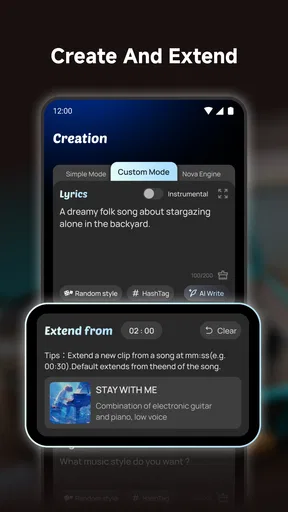
When you first open up MusicLab: AI Song & Music Video, you’re greeted with a clean and intuitive interface. No need to fret over complexities; this app is designed with simplicity in mind. The main dashboard is easy to navigate, with clear options that guide you through the process of creating your music video. Whether you're a tech guru or a complete novice, you'll feel right at home.
Features That Strike a Chord
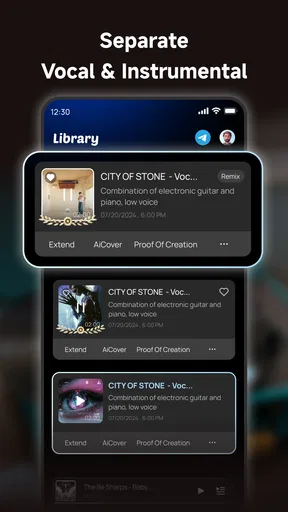
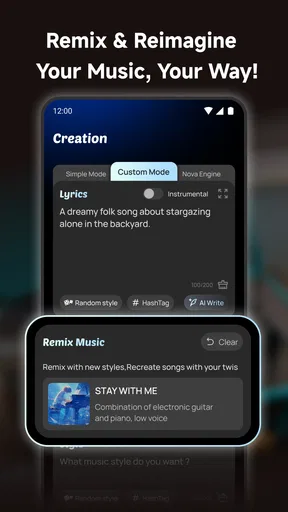
One of the standout features of the app is its AI-powered music creation tool. You can either upload your own beats or let the AI generate some fresh tracks for you. It's like having a mini-producer in your pocket! The quality of the AI-generated music is pretty impressive—it’s not just random noise but carefully curated tunes that could easily pass for chart-toppers.
Once your music is set, the next step is crafting the visuals. The app offers a variety of templates and effects to choose from. Whether you want something edgy, romantic, or just plain fun, there's a template that suits your vibe. Plus, the ability to customize effects means you can really let your creativity shine.
A Seamless Integration
What’s great about MusicLab is how smoothly it integrates with other platforms. Finished your masterpiece? You can easily share it on social media or download it directly to your device. The app supports high-quality resolutions, ensuring your video looks sharp and professional.
For those who enjoy collaboration, the app allows you to invite friends to join the creative process. Whether it’s co-writing a song or working on video edits, everything can be done collaboratively, making it a fun and engaging experience.
The Learning Curve: Easy Does It
If you're worried about getting stuck, fear not. There are helpful tutorials and guides within the app to assist you along the way. The developers seem to have anticipated every possible question, making sure users can find their way without frustration. It’s a gentle learning curve, which is a relief for those not too familiar with music production software.
Performance and Reliability
In terms of performance, MusicLab runs smoothly without any noticeable lags or crashes. It’s lightweight, so it doesn’t hog your phone’s resources, which is a big plus. The app is regularly updated, addressing any bugs and introducing new features, which shows a commitment to quality and user satisfaction.
Wrapping It Up: Is It Worth It?
So, is MusicLab: AI Song & Music Video worth downloading? If you're passionate about music and video creation but lack the resources or expertise, this app is a fantastic starting point. It combines ease of use with powerful features, making it accessible to everyone. Plus, the creative freedom it offers is unparalleled, allowing you to truly express yourself.
Whether you're looking to create content for personal enjoyment or to share with the world, MusicLab provides the tools you need to get started. So why not give it a whirl? Who knows, you might just discover your hidden talent for music production.
Verdict
Strengths of MusicLab:AI Song & Music Video
- User-friendly interface for easy navigation.
- Wide range of music editing tools available.
- AI-generated music tracks are high quality.
- Integrates seamlessly with social media platforms.
- Regular updates with new features and improvements.
Limitations of MusicLab:AI Song & Music Video
- Limited free version with in-app purchases.
- AI suggestions can sometimes lack creativity.
- Requires a stable internet connection.
- Occasional lag on older devices.
- Some features hidden behind paywall.
Other Releases by AI Song & Music Maker & AI Video & AI Photo
View All
Muvio - AI Music Video Maker
Music & Audio4.7
Similar Picks in This Category
View All
YouTube Music
Google LLC4.4

Samsung Music
Samsung Electronics Co., Ltd.3.8

Spotify: Music and Podcasts
Spotify AB4.3

JioSaavn - Music & Podcasts
Saavn Media Limited4.3

Lark Player:Music Player & MP3
Lark Player Studio - Music, MP3 & Video Player4.6

StarMaker: Sing Karaoke Songs
SKYWORK AI PTE. LTD.4.3
Frequently Asked Questions
What is MusicLab: AI Song & Music Video?
MusicLab: AI Song & Music Video is an innovative application that allows users to create music and music videos using artificial intelligence. The app provides various tools and features to help users compose songs, generate beats, and visualize music videos, making it suitable for both beginners and experienced musicians.
How does the AI feature work in MusicLab?
The AI in MusicLab analyzes user input and preferences to generate music and videos. By leveraging machine learning algorithms, it can suggest melodies, harmonies, and even visual effects that match the user’s style. This makes the creative process more intuitive and accessible for users who may not have a musical background.
Is MusicLab suitable for professional musicians?
Yes, MusicLab is designed for both amateurs and professional musicians. It offers advanced features that allow experienced users to fine-tune their compositions and videos. The app’s AI can provide creative inspiration and streamline the production process, making it a valuable tool for professionals seeking efficiency.
What devices are compatible with MusicLab?
MusicLab is available for both Android and iOS devices. Ensure that your device meets the app's system requirements for optimal performance. Regular updates are provided to enhance compatibility and user experience, so keeping your app and device updated is recommended.
Are there any subscription fees for MusicLab?
MusicLab offers a free version with basic features. However, there are premium subscription options available that provide access to advanced tools and features. These subscriptions are billed monthly or annually, offering flexibility depending on the user’s needs and budget.
